---
title: Can I pause my subscription?
description: Find out when you can pause, and what it means for your next billing cycle here.
---
[Skip to content](https://help.kodeco.com/can-i-pause-my-subscription#main-content)
[Contact us](https://help.kodeco.com/kb-tickets/new?hsLang=en)
[](https://www.kodeco.com/)
Open main navigation
Close main navigation
- [Contact us](https://help.kodeco.com/kb-tickets/new)
- [Go to Kodeco](https://www.kodeco.com/)
[Go to Kodeco](https://www.kodeco.com/)
Welcome — how can we help?
- There are no suggestions because the search field is empty.
1. [Help & Support](https://help.kodeco.com/?hsLang=en)
2. [Billing Details](https://help.kodeco.com/billing-details?hsLang=en)
# Can I pause my subscription?
## Find out when you can pause, and what it means for your next billing cycle here.
In 2022, we launched the option for monthly subscribers to pause their memberships for one to three months. This feature will be available in the [Billing tab of your account profile](https://store.kodeco.com/subscription), like here:
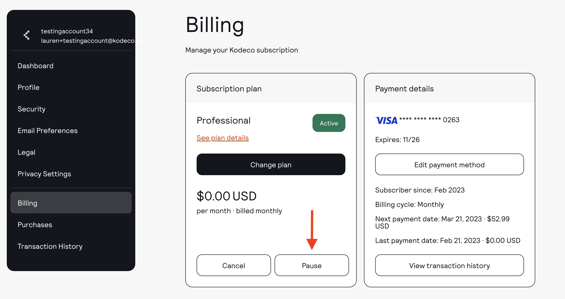
Pausing your subscription allows you to complete the remainder of your billing cycle, and when you'd normally renew next, instead your billing will be suspended for the length of time you selected during your pause.
Once your billing is paused, you'll still have access to all resources available as a free member. Once your pause period ends, your subscription will renew at your standard rate to continue your access to content. You'll receive a reminder email 3 days before the end of your pause period, as well as an email to confirm your subscription is unpaused.
Once your account is paused, you'll have all important dates (when you'll lose access to content, when you're account will be unpaused and billed) reflected directly in your billing tab:
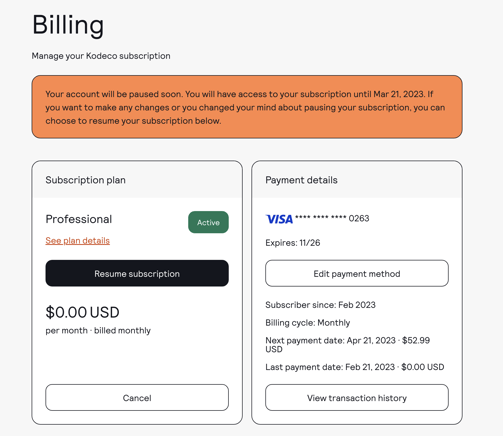
Currently we only offer the option to pause for monthly subscribers who have paid via Paddle, our current payment provider. If you are on an annual membership or paid via FastSpring, this option will not be visible within your account.
- [Live Bootcamps](https://help.kodeco.com/live-bootcamps?hsLang=en#main-content)
- [Information for Current Students](https://help.kodeco.com/live-bootcamps?hsLang=en#information-for-current-students)
- [Information for Prospective Students](https://help.kodeco.com/live-bootcamps?hsLang=en#information-for-prospective-students)
- [Community](https://help.kodeco.com/community?hsLang=en)
- [Billing Details](https://help.kodeco.com/billing-details?hsLang=en)
- [Team & Enterprise Subscriptions](https://help.kodeco.com/team-enterprise-subscriptions?hsLang=en)
- [Content Questions](https://help.kodeco.com/content-questions?hsLang=en)
- [About Our App](https://help.kodeco.com/about-our-app?hsLang=en)
- [Report a Problem](https://help.kodeco.com/report-a-problem?hsLang=en)
- [Privacy Policy & Consent](https://help.kodeco.com/privacy-policy-consent?hsLang=en)
- [General](https://help.kodeco.com/general?hsLang=en)
- [On-Demand Bootcamps](https://help.kodeco.com/on-demand-bootcamps?hsLang=en)
[](https://www.kodeco.com/)
Kodeco Help Center
Copyright © 2026, Kodeco Ltd